How Nexwin Works
Configure, Test and Publish
See exactly how Nexwin's AI receptionist fits into your business — from signup to your first AI-booked appointment. No technical skills needed, no disruption to your current setup.
Seven days and 100 call minutes included. Card required. No charge until the trial ends and your selected plan starts on day 8. Cancel anytime.
Your Journey with Nexwin
From signup to your first AI-booked appointment, here's exactly what happens — step by step. Most the time required depends on how much business information, call routing and calendar configuration you need.
Get a local number for your area
Pick your available area code (Sydney 02, Melbourne 03, Brisbane 07, Perth 08) and provision a dedicated Australian business number. No phone hardware is required.
Paste your website — we learn your business
Paste your website URL so Nexwin can draft information about your services, hours and service areas, then review and correct it. Upload documents or enter information manually where needed.
Connect your calendar for availability checks
One-click Google Calendar integration, with your timezone and working hours respected. Each team member connects their own calendar with their own timezone. Nexwin only offers times you can actually make — it respects your hours and the travel buffer you set between jobs.
Set the rules — you stay in control
Choose when to transfer calls to a human — angry caller, pricing questions, or any situation you define. Set after-hours behaviour and conversation flow.
Hit publish — start answering in seconds
One click to publish. Your AI starts answering calls in seconds. Every change is saved as a draft until you're ready.
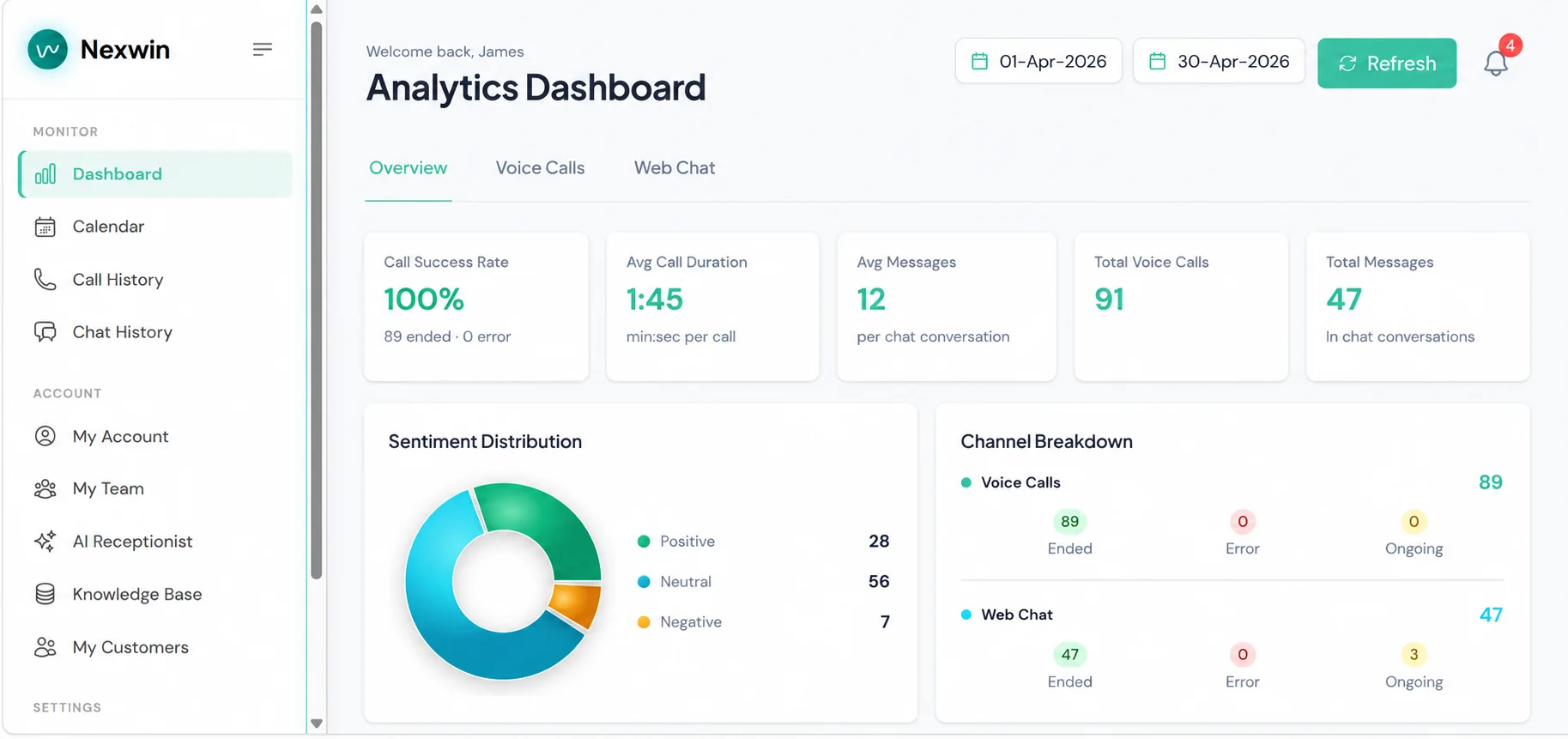
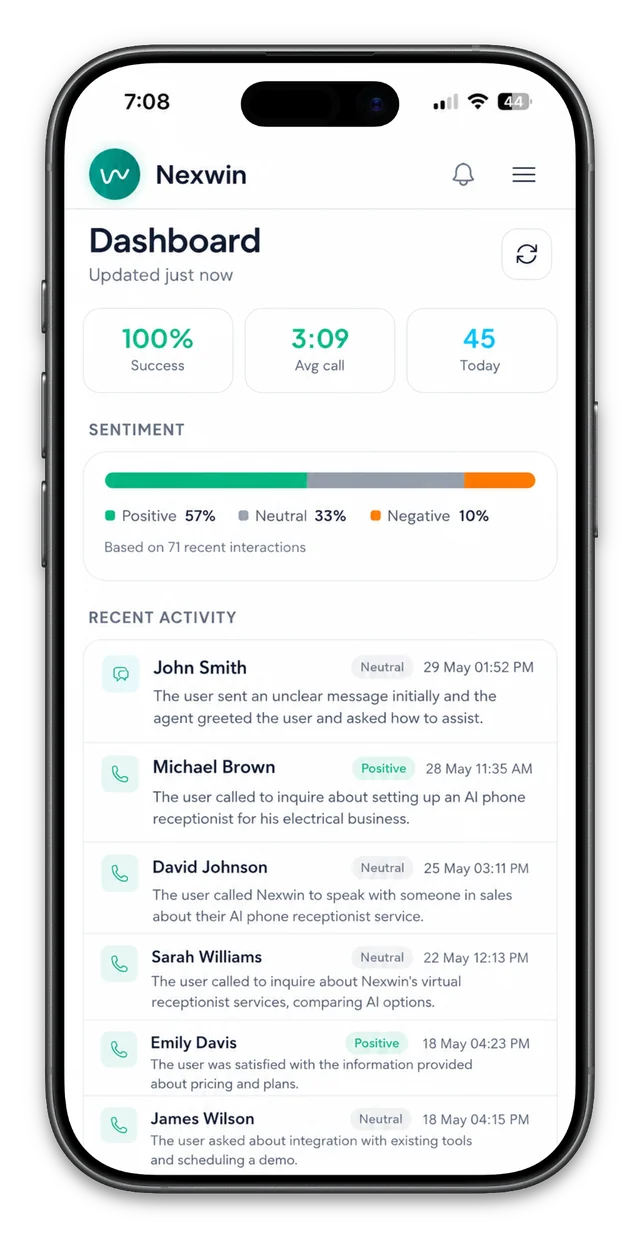
Handled-call details in your dashboard
Review available transcripts and recordings for calls and chats handled by Nexwin. Track appointments, call duration and trends, and export records to Excel.
What Happens to Your Existing Setup?
Nexwin works alongside what you already have — not against it. Nothing breaks, nothing changes until you're ready.
Your Phone Number
You keep your existing number. Forward calls to your new AI number during busy times, after hours, or all the time — whatever suits your business. Your current number, your choice.
Your Appointments
Already have appointments booked by your team? The AI sees them through Google Calendar sync. It works alongside your existing bookings, not against them.

Your Receptionist / Staff
Nexwin doesn't replace your team — it backs them up. When your staff are busy, on a call, or off for the day, the AI picks up. When a caller needs a human, the AI transfers with context.
Your Website (Nexwin AI Chatbot)
One small code snippet on your website and the chat widget appears. It matches your brand colours and voice. No redesign, no development work — paste and go.
A Real Example — How a Solo Sparkie Uses Nexwin
Before Nexwin
Dave's a one-man electrical business. He's up a ladder or under a house all day, so calls go to voicemail — and half of those callers ring the next sparkie on the list instead of leaving a message. The few he does get back to, he's chasing after knock-off when he'd rather be home.
After Nexwin
Dave forwards his calls to Nexwin whenever he's on a job. A customer he wired a shed for last year rings about adding a power point — Nexwin recognises Dave's regular by their number, greets them by name, checks Dave's real availability, and books a Thursday arvo slot that leaves him enough drive time from his morning job. The moment the call ends, Dave gets a text: name, number, address, and "wants an extra power point in the garage." He never touched his phone.
The Result
Dave reviews the calls, bookings and escalations Nexwin AI Receptionist handled, checks the calendar for conflicts, and follows up on any failed or uncertain workflow.
This is a representative scenario showing how a solo tradie would use Nexwin.
Common Concerns
Answers to the questions we hear most from business owners before they sign up.
Can I keep my existing phone number?
Yes. Forward your calls to your AI number, or use the AI number as your new business line. Your existing number stays yours — no porting needed.
Will the AI double-book my calendar?
No. The AI connects to Google Calendar and sees all existing appointments — human-booked or AI-booked — before confirming any new booking. Each team member's calendar is checked individually.
What if the AI says something wrong?
It only uses information from your knowledge base. If it doesn't know, it says so and offers to take a message or transfer to your team. You review every conversation in your dashboard.
Can I try before I commit?
Yes. The trial lasts seven days and includes 100 call minutes. A card is required at signup. There is no charge until the trial ends and your selected plan starts on day 8. Cancel anytime.
How long does setup actually take?
Setup time varies with the complexity of your services, call rules, knowledge base and integrations. Test the receptionist before publishing and keep a human fallback for calls that need judgement.
What happens outside business hours?
You choose: the AI can take a message and promise a callback, offer to book an appointment for the next available slot, or direct callers to voicemail. All interactions are logged in your dashboard.
Will it book me a job I can't get to?
No. It books against your real calendar and working hours and respects the travel buffer you set, so it won't double-book you or send you across town with no time.
Will it know my repeat customers?
Yes. It recognises returning callers by their number and already knows their history before it answers.
Ready to See It in Action?
Configure and test Nexwin AI Receptionist on your own workflow, hear the live demo, or walk through the setup with our team.
Seven days and 100 call minutes included. Card required. No charge until the trial ends and your selected plan starts on day 8. Cancel anytime.
Learn more: AI Phone Receptionist Australia | AI Receptionist for Tradies | AI Receptionist for Hotels | AI Receptionist for Real Estate | FAQ
Features in detail: All features | Smart Call Routing | Appointment Scheduling | Caller Memory & Recognition | Call & Chat Summaries | Knowledge Base Training | CRM Integrations | Mobile App