Every Feature Nexwin Gives Your Business
Nexwin answers your phone calls and website chats 24/7 in a natural Australian voice, books appointments straight into your calendar, decides when a call needs a human, and hands you a summary, transcript, and recording of every conversation. Both products — Nexwin AI Receptionist (phone) and Nexwin AI Chatbot (website) — run off one shared setup and one shared knowledge base, so what your AI knows on the phone is exactly what it knows in chat. This page is a screen-by-screen tour of what you actually get.
Your Whole Front Desk on One Screen
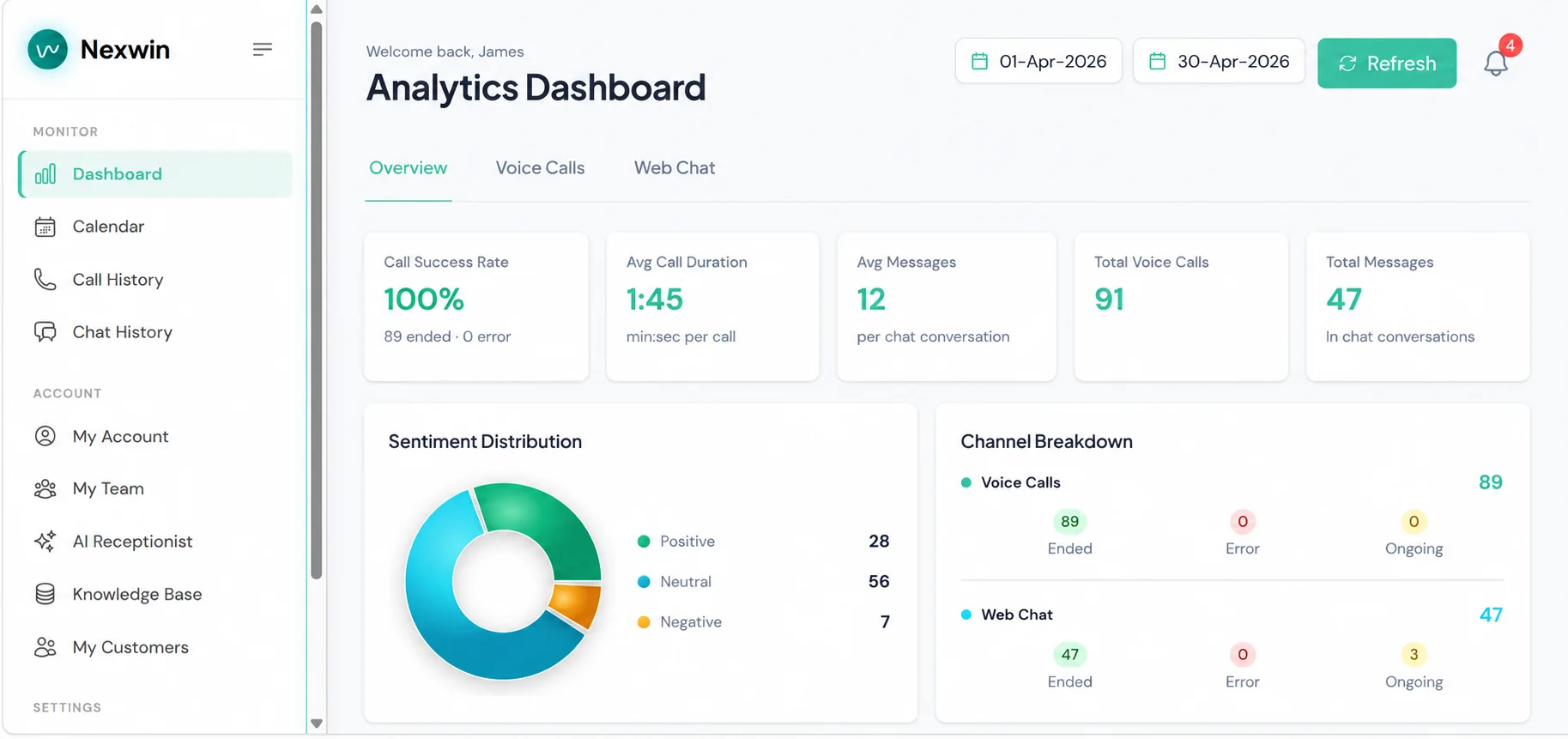
Every call and chat the AI handled, how they went, and what came out of them — in one dashboard you can open from a laptop or the iPhone and Android app. Pick a date range and you get call volume, average call length, sentiment breakdown, and a channel split between phone and web chat.
Call success rate
How many calls completed cleanly versus errored out, so you can see at a glance that nothing is falling over.
Sentiment distribution
Positive, neutral, and negative split across every conversation — an early warning when customers start getting frustrated.
Channel breakdown
Voice calls versus web chats, each split into ended, errored, and still ongoing.
Any date range
Compare this month to last, or pull the numbers for a single busy week.
You Always Know Exactly What Was Said
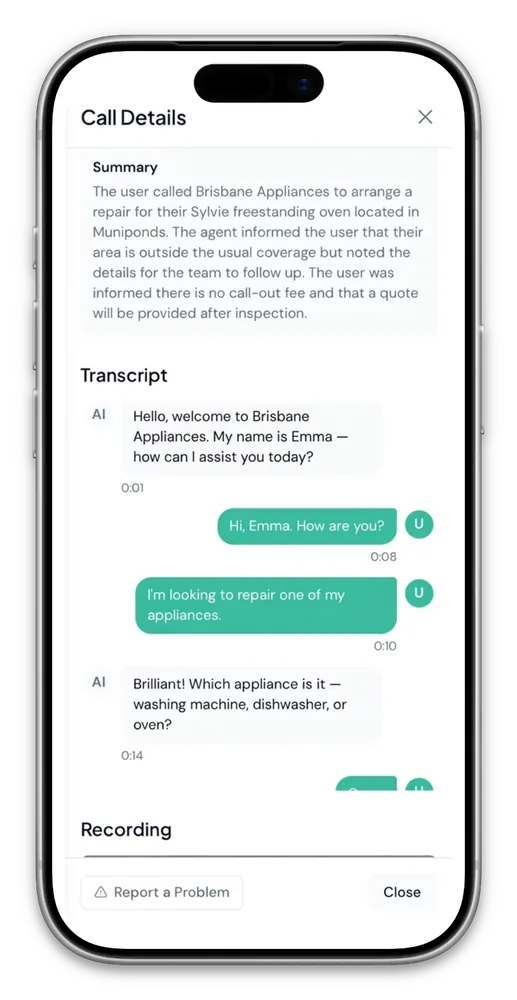
For calls and chats handled by Nexwin, the dashboard can provide a plain-English summary, available transcript or recording, contact details and extracted next steps. Review AI-generated records before acting on important information.
Handled Calls Logged, Summarised and Searchable
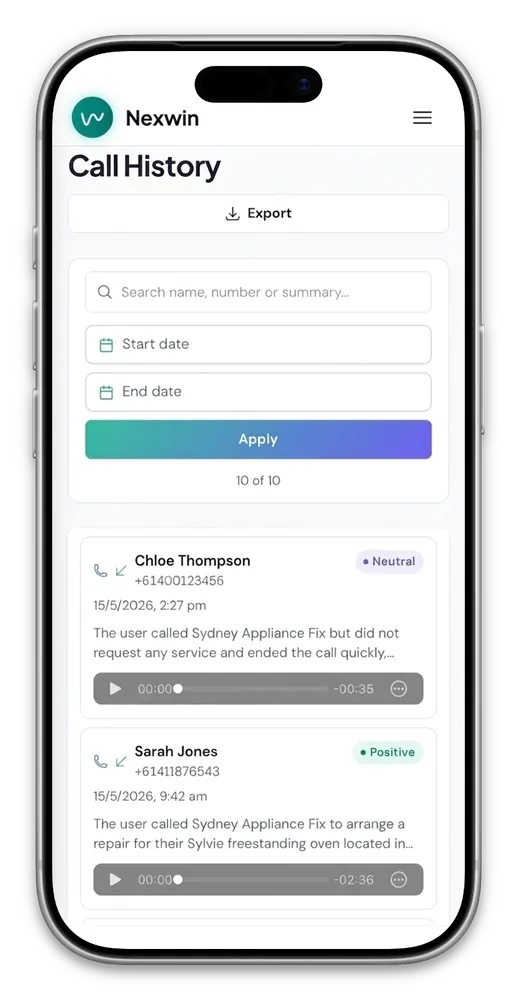
Search by name, number, or anything said in the conversation, filter by date, and export the lot. Open any call and you get the AI's plain-English summary, the full timestamped transcript, and the recording — useful for training, for disputes, and for catching up on what happened while you were on a job.
- AI summary, sentiment badge and available recording for handled calls
- Full timestamped transcript of both sides of the conversation
- Search by name, number, or keyword; filter by date range
- Conversation analysis: call status, sentiment, why the call ended
- Action items extracted automatically — who your team needs to ring back and why
- Export your call history whenever you want it
Appointments Land in Your Calendar While the Caller Is Still on the Line
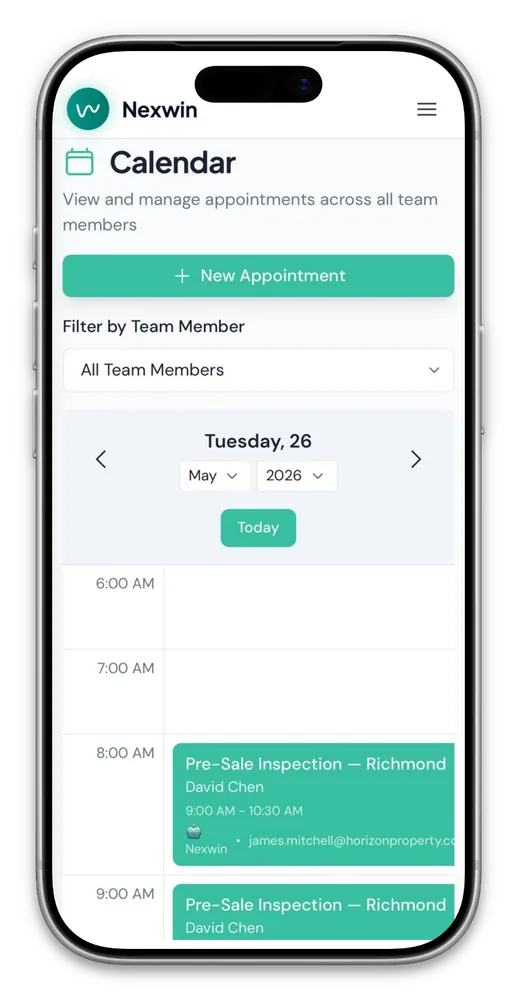
The AI checks your real availability before it commits, so it never double-books you — and the booking goes to the right person, around their existing jobs and working hours.
Real Availability, Checked Before It Says Yes
Nexwin AI Receptionist attempts to write confirmed bookings to the connected calendar during the call using configured team, job and working-hour rules. Successful AI-created bookings are tagged for review; stale availability and failed writes remain possible.
- Books, reschedules and cancels in real time
- All team members' schedules in one view, filterable
- Checks connected-calendar availability before booking attempts
- Bookable resources too: rooms, sites, vehicles, equipment
It Sounds Like Someone Who Works For You
Choose the voice and accent, disclose that the caller is speaking with an AI assistant, then write the opening words. Configuration changes can be reviewed, tested and republished from the dashboard.
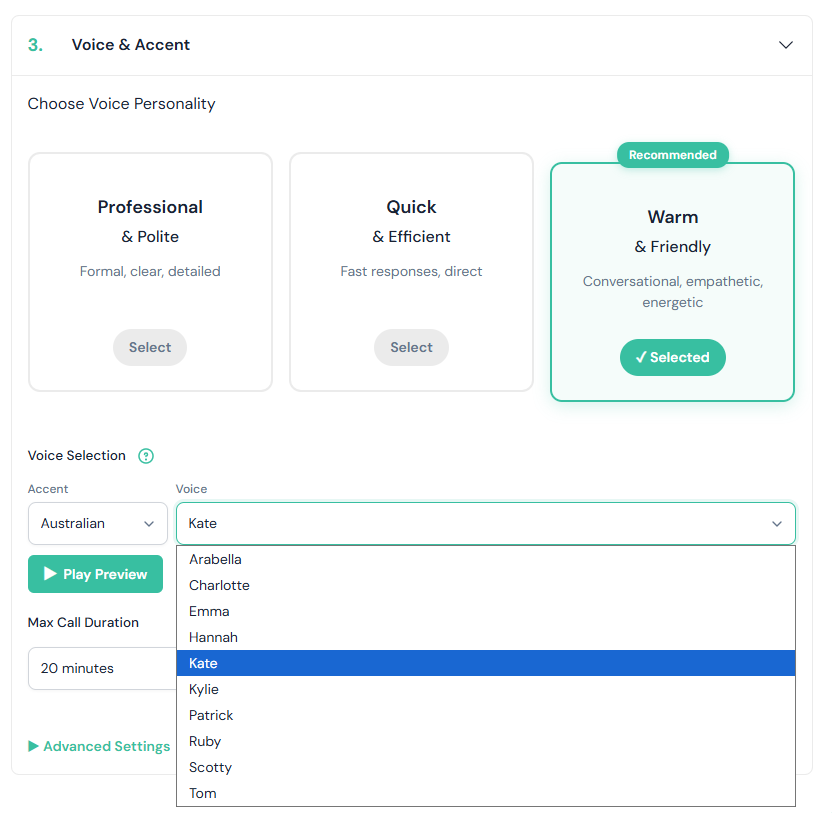
A Real Australian Voice, Not an Offshore Call Centre
Pick a voice personality — professional and polite, quick and efficient, or warm and friendly — then choose the actual voice. A range of Australian voices, male and female. Press Play Preview and hear it before a single customer does.
- Australian accent as standard; other accents available
- Named voices to choose from — Charlotte, Emma, Hannah, Kate, Kylie, Patrick, Ruby, Tom and more
- Preview any voice instantly before publishing
- Maximum call duration cap so no call runs away with your minutes
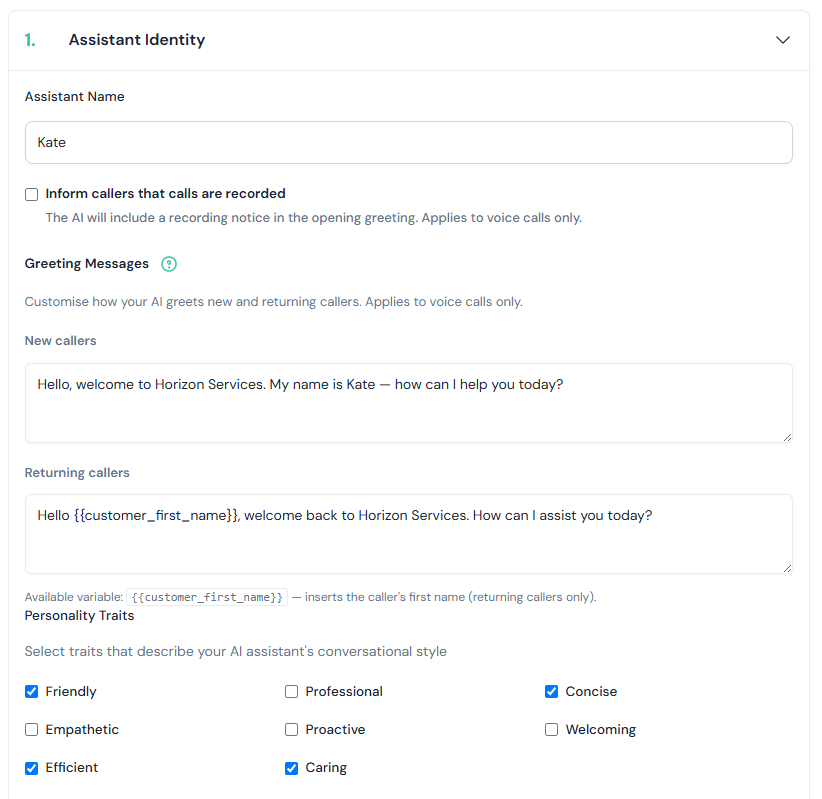
Give Your AI a Name and the Exact Words to Open With
Write the greeting yourself, word for word. Returning callers get a different one —
drop in {{customer_first_name}} and the AI welcomes them back by name
because it already recognised their number.
- Separate greetings for new and returning callers
- Personality traits — friendly, professional, concise, empathetic, efficient, caring
- Optional "this call is being recorded" notice in the opening line
- Same identity used across phone and website chat
The Same AI, Sitting on Your Website
Nexwin AI Chatbot answers website visitors using the same knowledge base, the same booking rules, and the same escalation conditions as your phone AI. One code snippet and it’s live — or email us and we’ll install it for you at no extra cost.
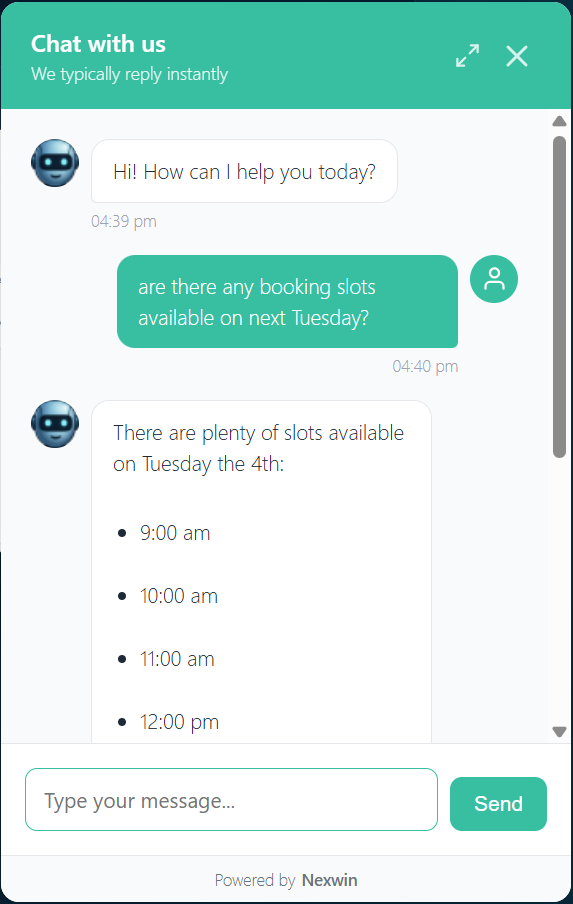
Visitors Get Real Answers, Not a Contact Form
Ask it about availability and it checks your actual calendar and offers real times. Ask about pricing and it answers from your knowledge base. It captures the visitor's details, books the appointment, and escalates to your team on the same conditions your phone AI uses.
- Answers from your knowledge base, not generic AI waffle
- Checks live calendar availability and books in-chat
- Captures name, contact details and what they wanted
- Every chat logged, summarised and searchable like a call
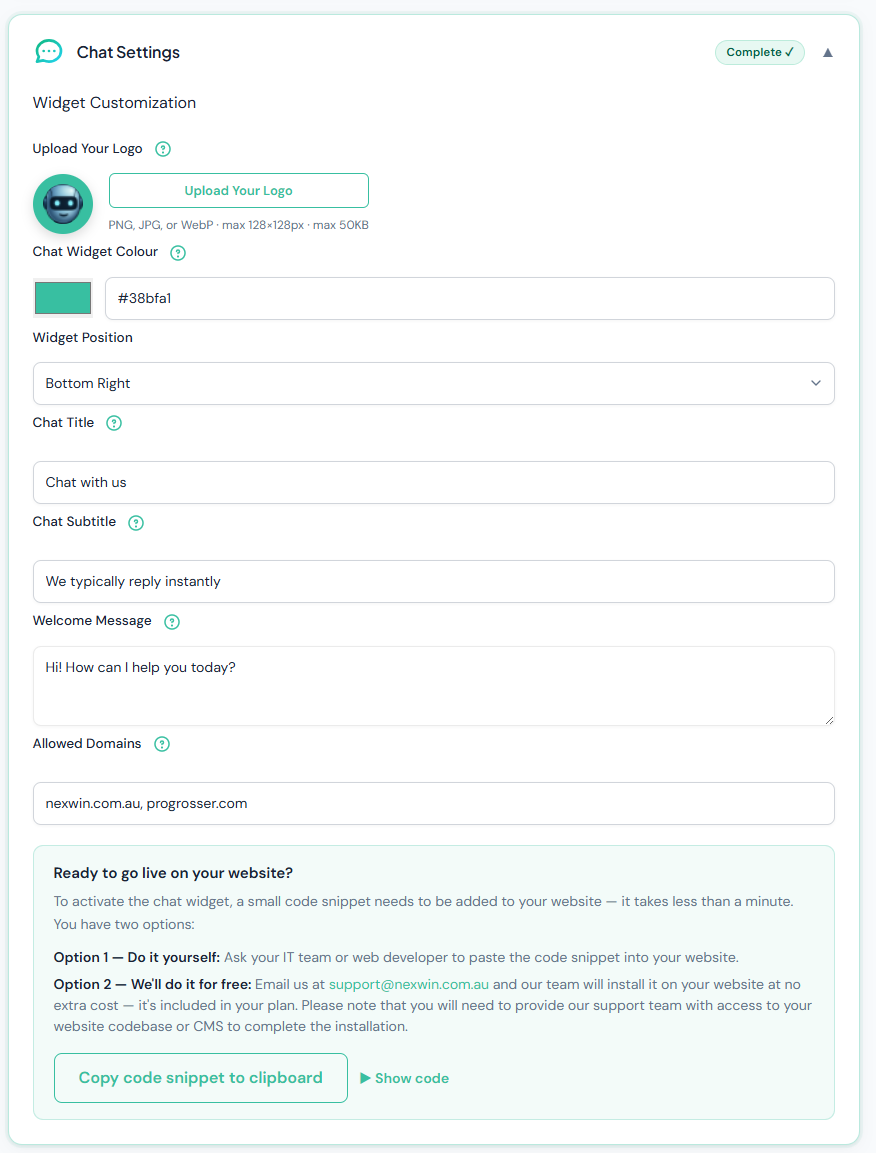
Make It Look Like Part of Your Site
Upload your logo, set the widget colour to your brand hex, choose which corner it sits in, and write the title, subtitle and opening message. Lock it to your own domains so nobody can lift your snippet and run your AI on their site.
- Logo, colour, position, title, subtitle and welcome message
- Domain allow-list stops the widget being used elsewhere
- Copy the snippet and paste it in — under a minute
- Or email support and we'll install it for free
That’s What It Does. Here’s What You Can Change.
The rest of this page is the configuration behind it — what you set up once, and adjust as your business changes.
Trained on Your Business, Not a Generic Script
Nexwin reads your website, your documents, and anything else you paste in, then answers from that. It also knows where you'll travel and what to do when someone rings from outside your patch.
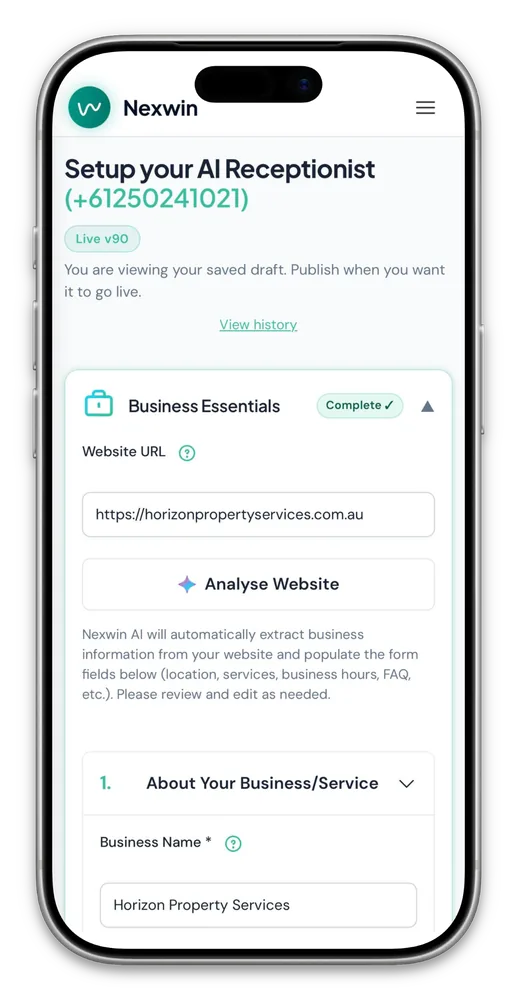
Paste Your Website URL and It Fills Itself In
Hit Analyse Website and Nexwin reads your site, then pre-fills your business name, services, opening hours, location, and FAQs. You review it, fix anything it got wrong, and publish. That's the bulk of setup done.
- Extracts services, hours, location and FAQs automatically
- Everything stays editable — nothing is locked in
- Re-analyse whenever your site changes
- Industry-specific defaults for 60+ business types
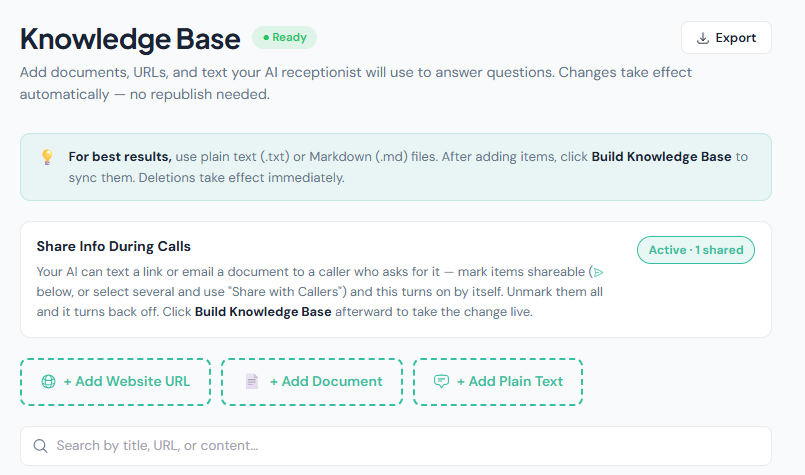
Feed It Your Price List, Then Let It Text the Brochure
Add URLs, upload documents, or paste plain text — service menus, pricing sheets, warranty terms, clinic policies. Changes take effect automatically, no republishing. Mark an item as shareable and the AI can text a link or email the document to a caller who asks for it, mid-conversation, without hanging up. Pro
- Website URLs, uploaded documents, and pasted text
- Searchable by title, URL, or content
- Shared by both Nexwin AI Receptionist and Nexwin AI Chatbot — train once, works everywhere
- Share Info During Calls: SMS a link or email a PDF while still on the phone
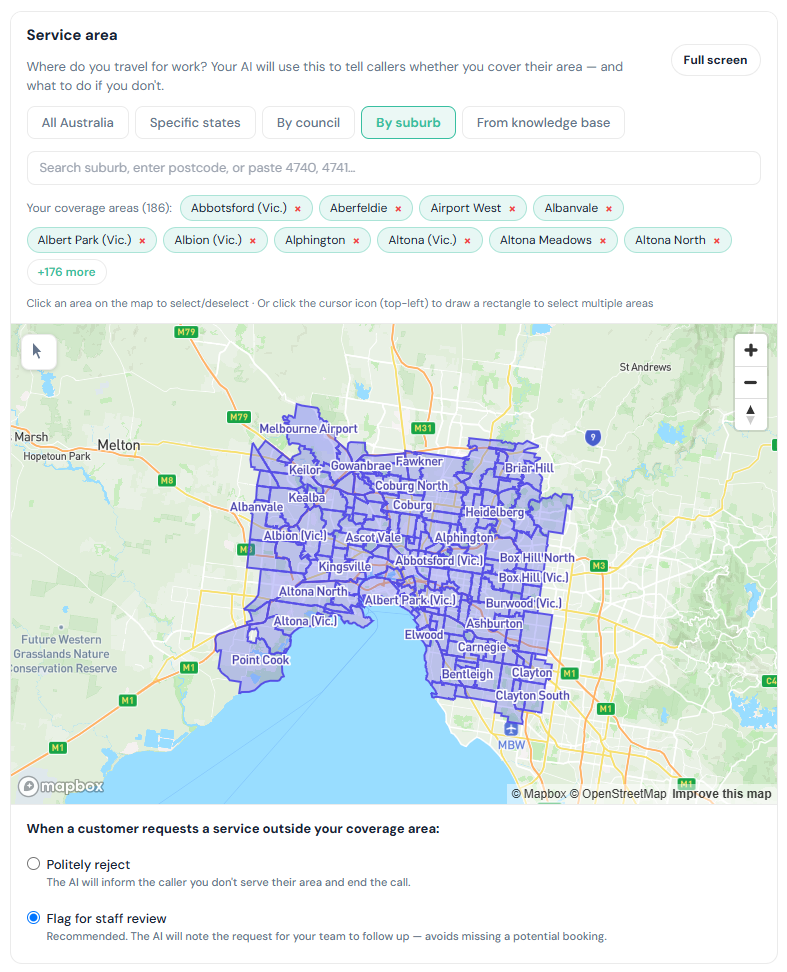
Draw the Area You Actually Travel To
Select all of Australia, specific states, councils, or individual suburbs — or drag a box across the map and grab a hundred at once. When someone rings from outside your patch, the AI either politely declines or takes the job down for your team to look at. Review failed and abandoned calls because no system guarantees that every booking completes.
- Select by state, council, suburb, postcode, or straight off the map
- Pull your coverage area from your knowledge base automatically
- Out-of-area calls: politely decline, or flag for staff review
- The AI tells callers up front whether you cover them
It Knows Which Calls It Shouldn't Handle Alone
An AI receptionist is only safe if it knows its limits. You decide exactly what triggers a transfer to a human, who that human is, and what happens when it's 11pm and nobody's picking up.
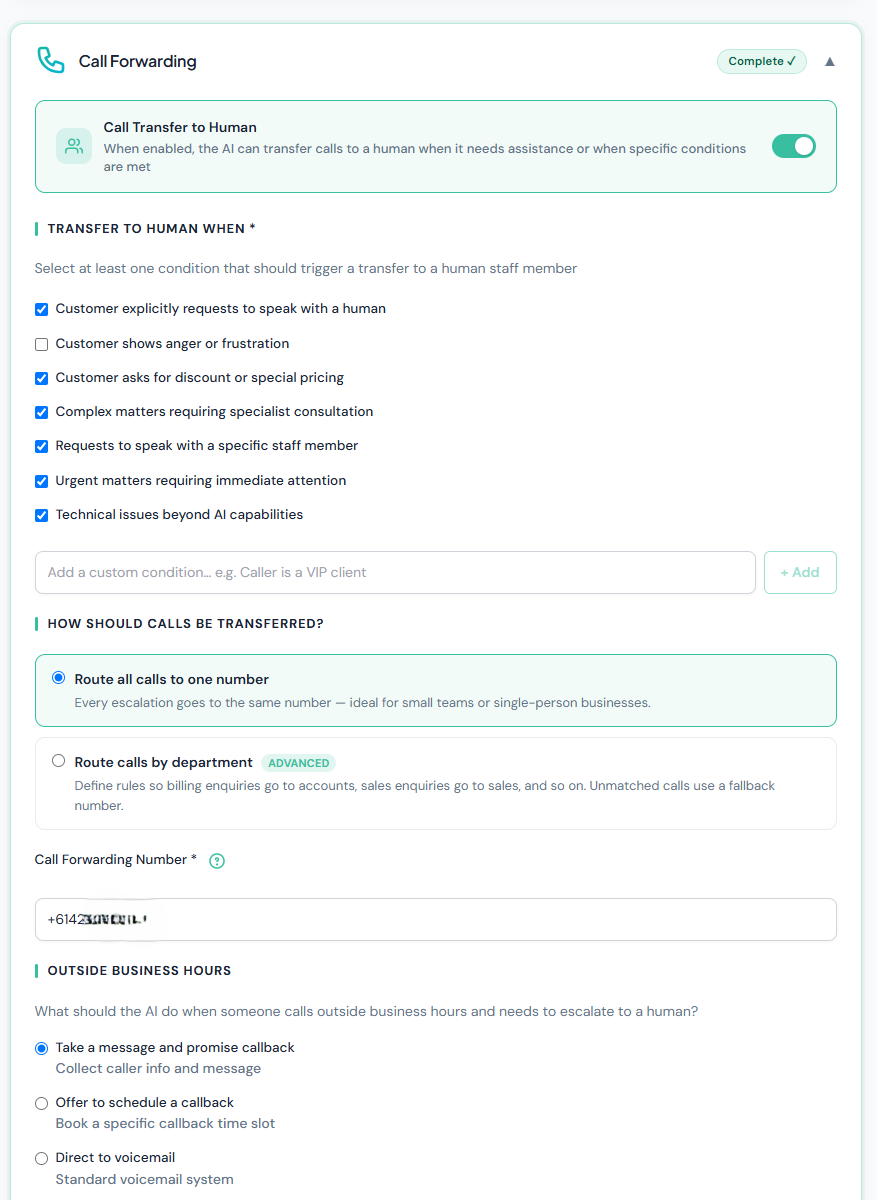
You Choose What Gets Escalated
Tick the conditions that matter to you: the caller explicitly asks for a person, they sound angry, they want a discount, they need a specialist, it's urgent. Add your own in plain English — "caller is a VIP client" — and the AI works out when it applies.
- Seven built-in escalation triggers, plus unlimited custom ones
- Written in plain English — no rules engine, no code
- After hours: take a message, book a callback slot, or send to voicemail
- Solo operators can route everything to one mobile number
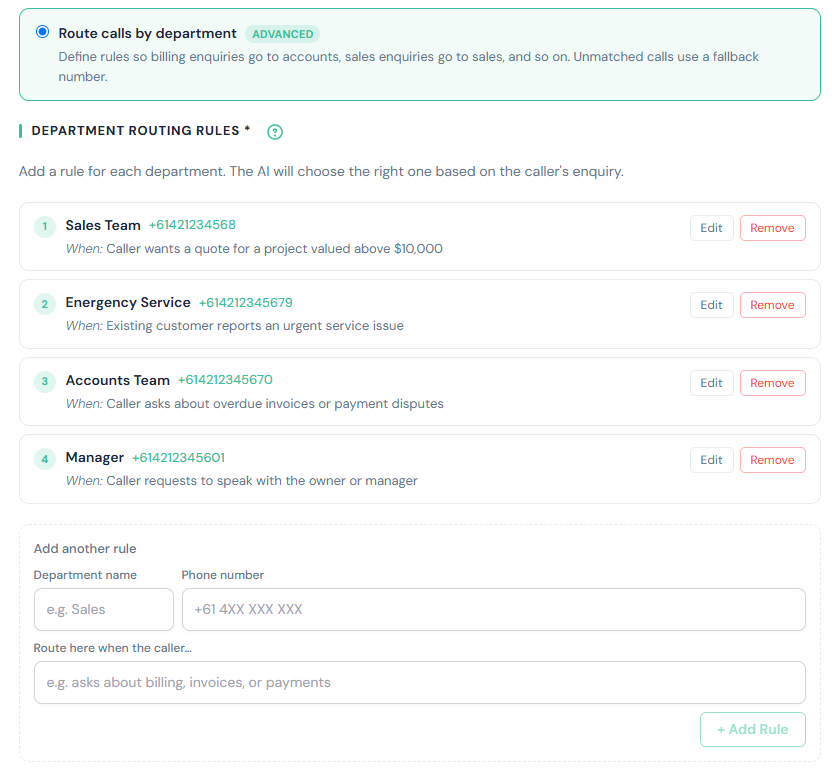
Right Person, First Time — No Switchboard
Give each team a number and describe when calls should go there: "caller wants a quote for a project above $10,000" → sales. "Existing customer reports an urgent service issue" → emergency. The AI reads the caller's intent and picks the rule. Anything that doesn't match goes to your fallback number.
- Unlimited department rules with their own numbers
- Conditions written the way you'd explain it to a new receptionist
- Configurable fallback number for unmatched calls
- Warm transfer — the caller isn't dumped into a cold queue
Tune Exactly How It Speaks
These are the dials that take it from good to indistinguishable — how much it says, and how it pronounces the words that matter in your business.
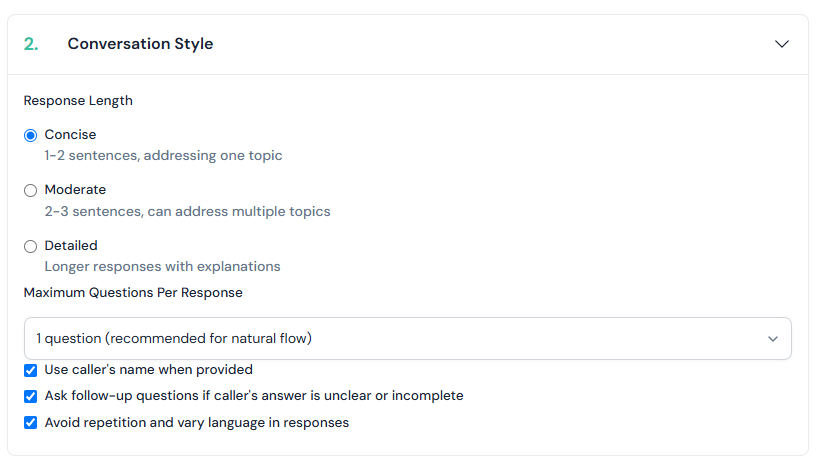
Control How Much It Talks
A busy trade business wants short answers and a fast booking. A law firm wants the detail. Set response length, cap how many questions the AI asks at once, and stop it from firing off three questions in a row.
- Concise, moderate, or detailed responses
- One question at a time, for a natural back-and-forth
- Uses the caller's name once they give it
- Asks a follow-up when an answer is unclear, instead of guessing
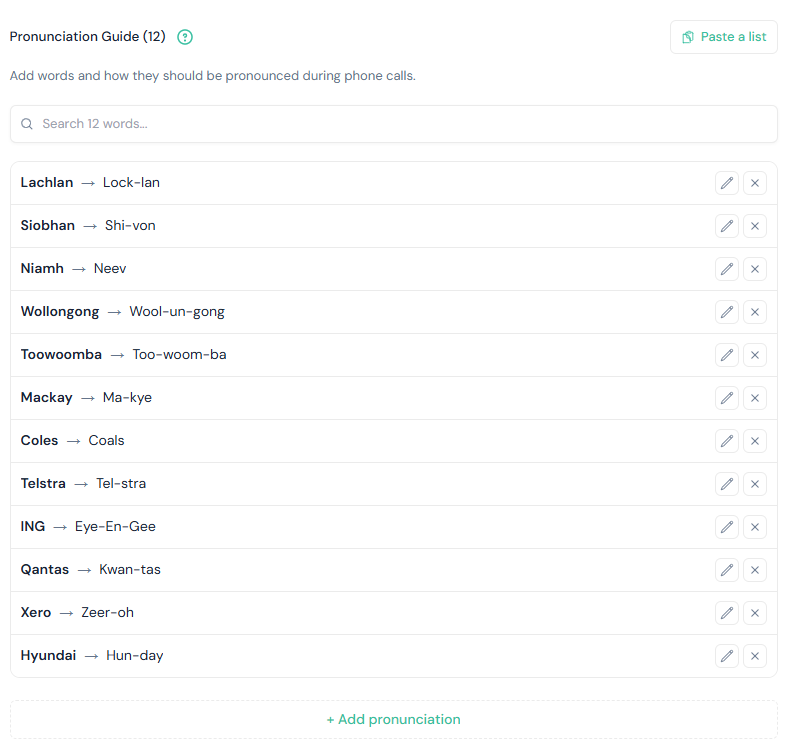
Teach It to Say Wollongong Properly
Place names, brand names, surnames, and industry jargon are where most AI voices give themselves away. Add the word and how it should sound — "Siobhan → Shi-von", "Toowoomba → Too-woom-ba" — and it says it right every time.
- Unlimited custom pronunciations
- Paste a whole list at once instead of adding one by one
- Ideal for suburb names, product names, and clinician surnames
- Searchable, editable, and applies to every call
The Details That Make It Yours
Identity checks before a booking changes hands, automatic video links, confirmation emails from your own domain, and notifications that only fire when you actually need to know.
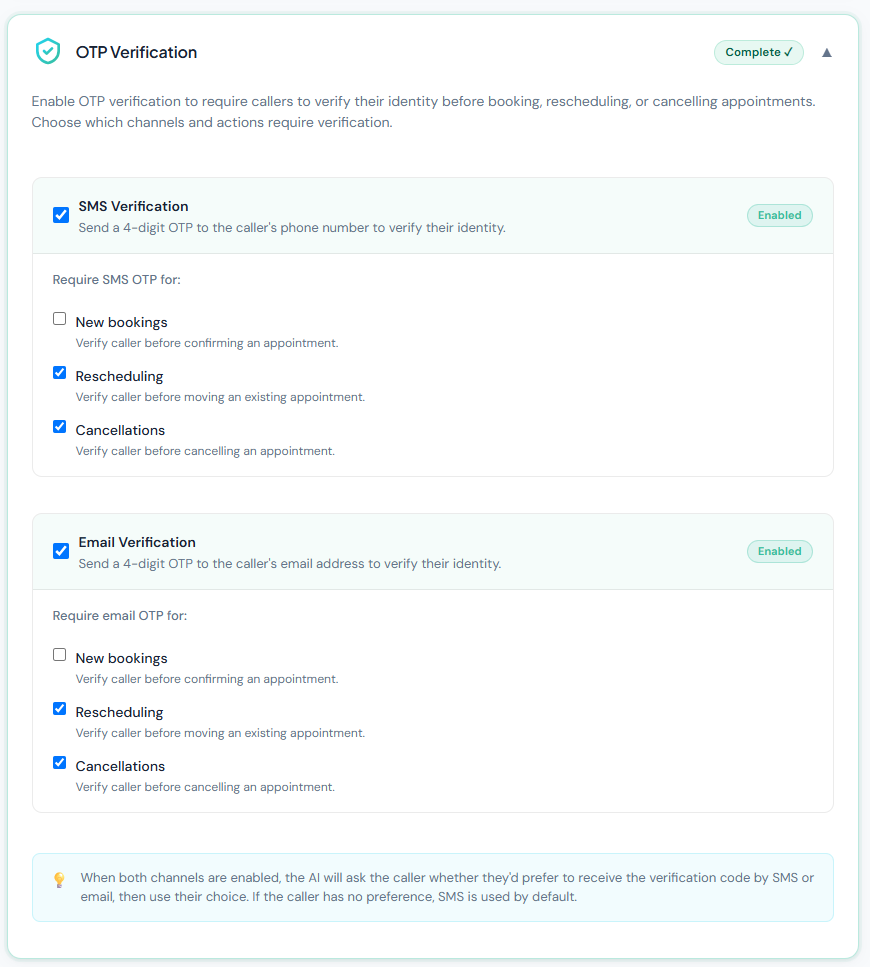
Nobody Cancels Someone Else's Appointment
Require a four-digit code before a caller can book, move, or cancel. Send it by SMS, by email, or let the caller choose. Most businesses leave new bookings open and lock down reschedules and cancellations — which is exactly where the risk sits.
- Per-action control: new bookings, reschedules, cancellations
- SMS and email channels, independently switchable
- Caller picks their preferred channel when both are on
- Optional — leave it off entirely if it's not your risk profile
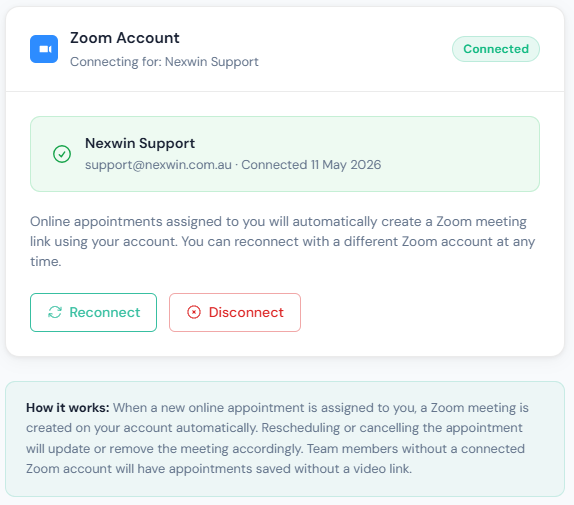
Online Appointments Get a Meeting Link Automatically
Connect a team member's Zoom account once. From then on, any online appointment assigned to them creates a Zoom meeting on their account, and the link goes out with the confirmation. Reschedule the appointment and the meeting moves with it; cancel it and the meeting disappears.
- Per-team-member Zoom connection
- Meeting created, updated and cancelled in step with the booking
- Link included in the customer's confirmation email
- Team members without Zoom simply get a booking with no video link
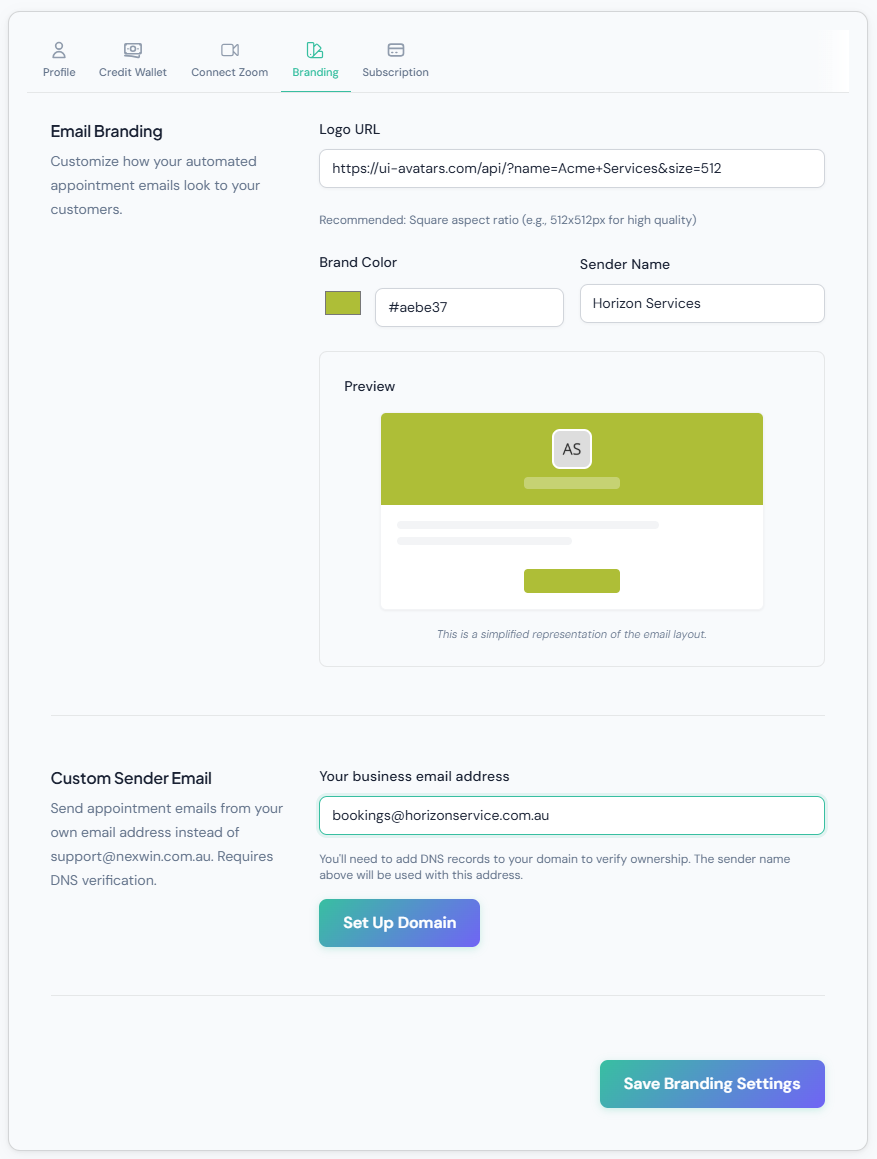
Confirmations That Look Like They Came From You
Set your logo, your brand colour, and your sender name, and every appointment email goes out looking like part of your business. Verify your domain and they'll send from your own address — [email protected] — instead of ours.
- Logo, brand colour and sender name with a live preview
- Custom sender address after DNS verification
- Applies to confirmations, reschedules and cancellations
- Customers never see a third-party brand in their inbox
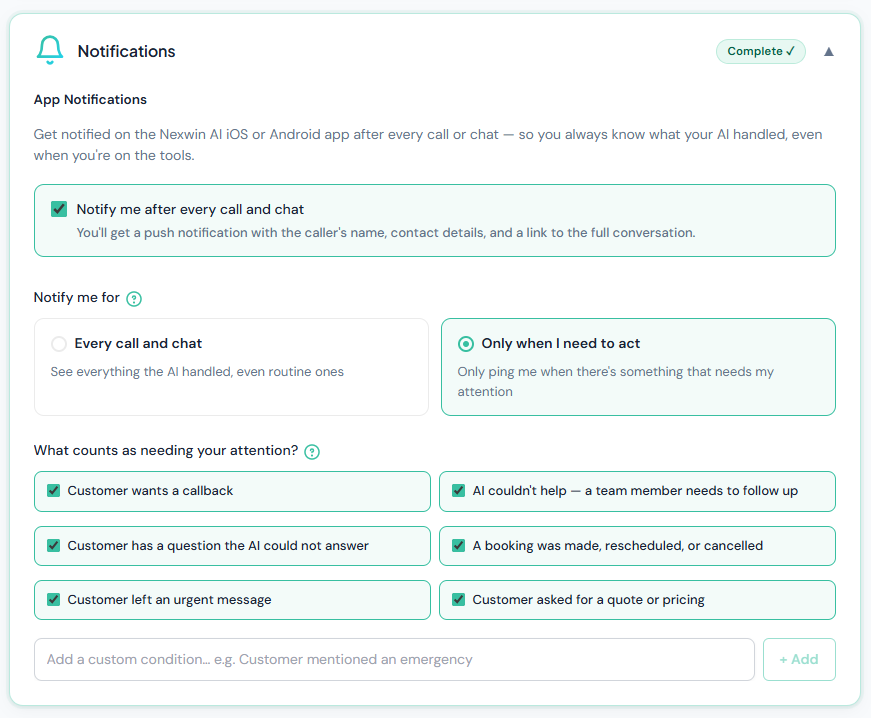
Get Pinged Only When It Actually Matters
Configure push notifications to the iPhone or Android app for completed calls and chats, or only when something needs you. Tick the situations that warrant an interruption and ignore the routine ones. Available notifications can include captured contact details and a link to the conversation; delivery and captured fields are not guaranteed.
- Every conversation, or only ones needing action
- Triggers: callback requested, booking made or cancelled, urgent message, quote requested
- Flags anything the AI couldn't answer, so a person can follow up
- Add your own conditions in plain English
Change Anything, Publish When You're Ready
Your whole receptionist lives on one screen, split into sections you can complete in any order. Edits save as a draft — your live AI keeps running on the last published version until you decide to push the change.
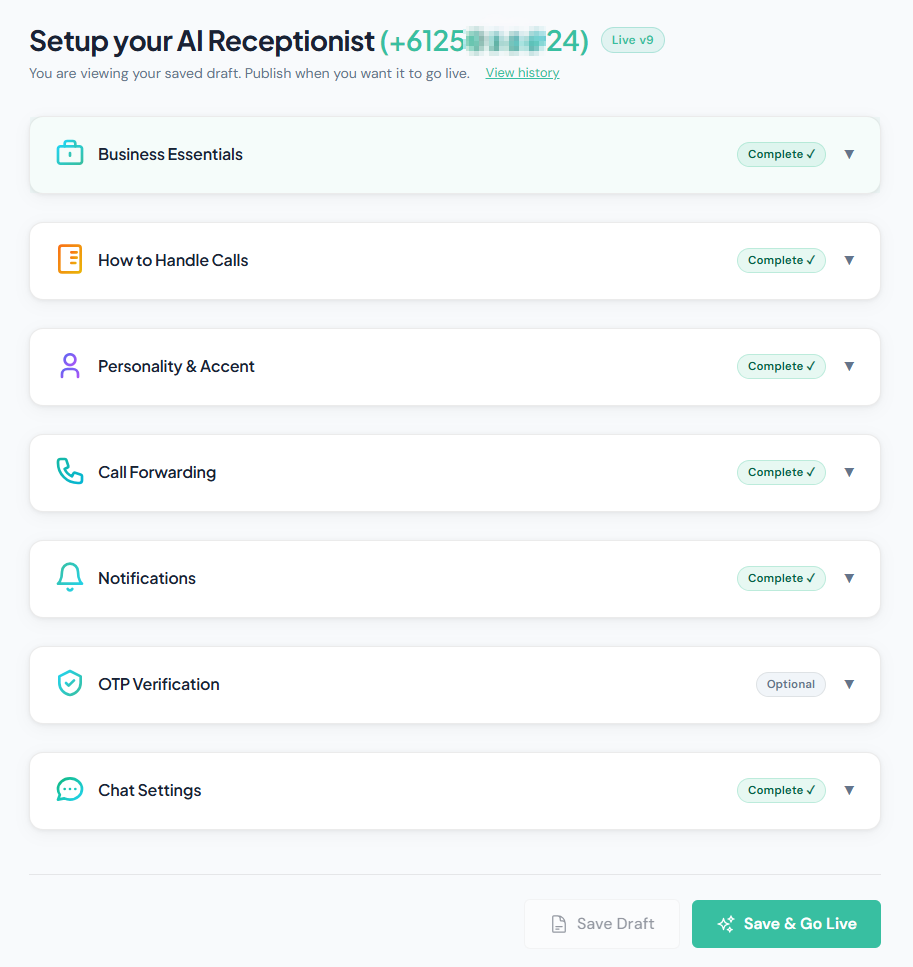
Seven Sections, a Draft, and a Go-Live Button
Business essentials, how to handle calls, personality and accent, call forwarding, notifications, OTP verification, and chat settings. Each one tells you whether it's complete. Save a draft, sleep on it, publish tomorrow — and if a change doesn't work out, the version history shows every published version so you can see what changed.
- Draft and publish, like updating a website
- Version history of every published configuration
- Your own dedicated Australian phone number, shown at the top
- Completion status per section so nothing gets missed
What Else Comes With It
The things that don't need a screenshot but matter once you're running on it day to day.
Native iPhone & Android app
Call history, transcripts, recordings, calendar and settings from your pocket — the same account, not a cut-down version.
Caller memory
Matches an incoming number to your customer list and knows their history before it picks up, so regulars don't have to start over.
Team members & roles
Invite staff, set who owns which appointments, and restrict setup and billing to owners and administrators.
Bookable assets
Rooms, sites, vehicles and equipment can be booked alongside people — and you can hide an asset's name from callers.
Customer records
Successfully identified callers can be linked to records with available contact details and call history. Withheld, shared or changed numbers need review.
Concurrent calls
Supports up to 5 simultaneous calls on Business and up to 10 on Pro. Configure fallback handling for calls beyond the plan limit or affected by an outage.
CRM & custom integrations
Connects into the CRM or practice-management software you already use. Pro
Australian data handling
Runs on Google Cloud, encrypted in transit and at rest, handled under the Privacy Act 1988 — see our privacy policy.
60+ industry presets
From plumbers and electricians to hotels, law firms, salons and real estate — the setup adapts to your trade.
Full Write-Ups on the Big Features
Each of these has its own page with the detail, the limits, and how Australian businesses are using it.
AI Phone Answering
Provides 24/7 AI call handling in an Australian voice, subject to plan limits and upstream-service availability, with configurable fallback handling.
AI Website Chatbot
Engages website visitors, answers questions, and captures leads around the clock.
Smart Appointment Scheduling
Checks connected-calendar availability before attempting to create an appointment. Conflicts and failed writes remain possible and should be monitored.
Call & Chat Summaries
Handled calls and chats can produce an AI-written summary, sentiment, available transcript and recording. Review important details.
Caller Memory & Recognition
Remembers repeat callers and their history, so no one has to repeat themselves.
Smart Call Routing & Handoff
Routes calls by department or urgency, and warm-transfers to a human when it matters.
Knowledge Base Training
Train it on your website and your own documents, so every answer matches your business.
CRM & Custom Integrations
Connects into the CRM or practice software you already use (Pro plans).
Native Mobile App
Manage calls, bookings, and summaries from the iPhone or Android app.
See It Running on Your Own Business
Every screen on this page is part of the standard product — not an enterprise add-on. Nexwin AI Receptionist starts at $249/month +GST and Nexwin AI Chatbot at $129/month +GST, and the 7-day free trial includes 100 minutes.
Seven days and 100 call minutes included for Nexwin AI Receptionist. Card required. No charge until the trial ends and your selected plan starts on day 8. Cancel anytime.
Related: Pricing | How It Works | Nexwin AI Receptionist | Nexwin AI Chatbot | FAQ